How to Get Better Results from 3D Printers

These issues frustrate beginners and experienced makers alike. However, successful printing does not always require expensive equipment or advanced technical skills.
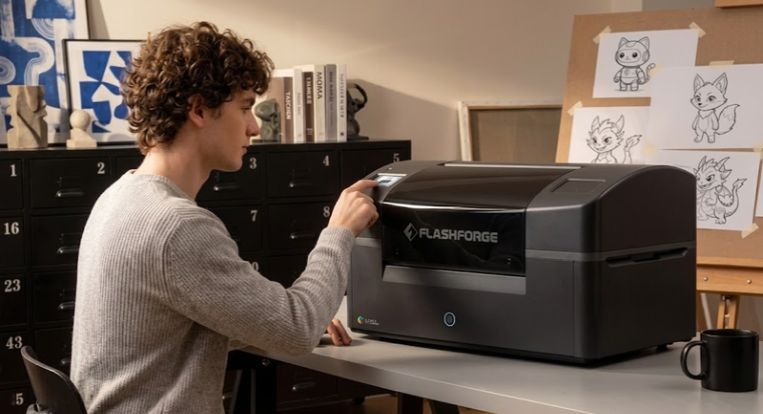
Have you ever started a 3D printing project excitedly, only to encounter uneven layers, poor adhesion, or disappointing results? These issues frustrate beginners and experienced makers alike. However, successful printing does not always require expensive equipment or advanced technical skills.
Instead, choosing suitable machines, materials, and settings can improve your results. Flashforge US offers various printing solutions, including 3D printers, filaments, and accessories. These products support different creative needs and printing requirements. Understanding how these components work together helps you achieve cleaner prints and smoother results.
Understanding Common 3D Printing Problems
Although 3D printing simplifies customization, several challenges can affect finished products. Therefore, recognizing these issues helps you find practical solutions and avoid wasting materials
Some common problems include:
- Poor First-Layer Adhesion: Prints sometimes detach from the build plate during printing.
- Stringing: Thin plastic strands appear between different sections of a model.
- Uneven Layers: Incorrect settings or mechanical problems create inconsistent surfaces.
- Warping: Printed corners lift when materials cool unevenly.
- Clogged Nozzles: Dirt, debris, or incorrect temperatures interrupt filament flow.
- Inconsistent Dimensions: Poor calibration reduces the accuracy of finished objects.
These problems often develop when users overlook essential settings or equipment maintenance.
Why Do 3D Printers Produce Imperfect Results?
Several factors influence printing quality. Therefore, understanding their causes helps prevent repeated failures.
Incorrect Printing Settings
Every printing material requires suitable temperature, speed, and cooling settings. However, unsuitable settings can create weak layers, rough surfaces, or excessive stringing.
Low-Quality or Unsuitable Materials
Not all 3D printing filaments offer identical properties. Some materials provide flexibility, while others prioritize strength or temperature resistance. Therefore, choosing unsuitable filament can affect durability and appearance.
Poor Equipment Maintenance
Dust, worn nozzles, and dirty build plates reduce printing consistency. Additionally, loose components can affect movement and printing accuracy.
Incorrect Model Preparation
Poorly positioned models and unsuitable support structures create unnecessary printing difficulties. Consequently, reviewing your design beforehand helps prevent avoidable mistakes.
Practical Ways to Improve Your 3D Printing Results
You don't need complicated techniques to improve your printing experience. Instead, follow these straightforward strategies to achieve better results.
Choose the Right Filament for Your Project
First, identify what your finished object needs to accomplish. Different materials support different applications and project requirements.
Consider these popular options:
- PLA: Supports beginners, decorative models, and everyday prototypes.
- PETG: Provides a useful balance between durability and flexibility.
- ABS: Supports projects that require greater heat resistance.
- TPU: Works well for flexible objects and specialized components.
- ASA: Offers useful weather resistance for certain outdoor applications.
Before purchasing, check filament diameter, printer compatibility, and recommended temperatures. Additionally, quality 3D printing filaments help maintain consistent extrusion and surface appearance.
Keep Your Printer Clean and Calibrated
Regular maintenance protects your equipment and supports reliable performance. Fortunately, you can handle basic maintenance without professional assistance.
Follow these simple practices:
- Clean the build plate before starting new projects.
- Remove dust and debris from accessible printer components.
- Inspect the nozzle for blockages or accumulated material.
- Check belt tension and moving components regularly.
- Level or calibrate the build plate whenever necessary.
- Follow the manufacturer's maintenance recommendations.
These habits help prevent unnecessary printing failures and equipment problems.
Adjust Speed and Temperature Carefully
Printing too quickly can reduce detail and weaken layer bonding. Similarly, incorrect temperatures can cause poor extrusion or material deformation.
First, select recommended slicer settings for your chosen filament. Then, print a small test model before attempting larger projects. Gradually adjust settings until you achieve consistent results.
Invest in Useful Printer Accessories
The right 3D printer accessories can simplify everyday printing tasks. For instance, additional build plates, replacement nozzles, and filament storage solutions support maintenance and organization.
However, prioritize accessories that address your actual printing challenges. This approach prevents unnecessary purchases and helps you build a practical setup.
Choosing Better Equipment for Consistent Printing
Sometimes, repeated printing problems indicate that your current machine no longer meets your requirements. In that case, upgrading your equipment may offer a more convenient solution.
Flashforge US offers several machines for different printing requirements. Its product lineup includes the Adventurer series, AD5X, and Creator 5 series. These machines support different needs, from accessible desktop printing to advanced multicolor production.
Before selecting a machine, compare these important specifications:
- Build Volume: Choose dimensions that accommodate your typical projects.
- Printing Speed: Consider speed alongside accuracy and surface quality.
- Material Compatibility: Check which filaments your printer supports.
- Automatic Features: Explore useful calibration and monitoring functions.
- Maintenance Requirements: Consider replacement parts and ongoing support.
For example, the Adventurer 5M offers an entry-level option. Meanwhile, the AD5X supports multicolor printing capabilities. Additionally, the Creator 5 series provides multi-toolhead printing options. These machines allow buyers to compare features before choosing suitable equipment. Consequently, you can select a printer that matches your experience and creative goals.
How the Right Upgrade Improves Your Printing Experience
Upgrading your equipment offers benefits beyond producing attractive models. Furthermore, a suitable setup can simplify everyday printing tasks.
Here are several advantages worth considering:
- Better Workflow: Suitable equipment reduces repetitive adjustments and simplifies printing tasks.
- More Creative Freedom: Compatible materials support different project requirements.
- Improved Consistency: Proper calibration and reliable components help maintain printing quality.
- Greater Convenience: Useful accessories simplify maintenance and material handling.
- Expanded Possibilities: Multicolor capabilities introduce more creative design options.
Furthermore, combining suitable 3D printing filaments with compatible 3D printer accessories creates an organized setup. However, remember that equipment alone cannot guarantee perfect results. Proper preparation, suitable settings, and regular maintenance remain essential.
Make Smarter Choices for Your Next 3D Printing Project
Successful 3D printing starts with understanding your equipment and materials. By choosing suitable filaments, maintaining your machine, and adjusting settings carefully, you can prevent common printing problems. Whether you create prototypes, decorative objects, functional parts, or personalized gifts, the right setup matters.
Therefore, consider your project requirements, available space, and long-term printing goals before upgrading. Flashforge US offers various 3D printers, materials, and compatible accessories worth exploring. Compare available options and understand their features before making your decision. Then, choose equipment that supports your creative ambitions and printing requirements.
With informed decisions and consistent maintenance, you can make every printing project more rewarding.