How to Build a More Comfortable Workspace With Ergonomic Office Furniture

Long workdays can leave your back, neck, and shoulders feeling exhausted.
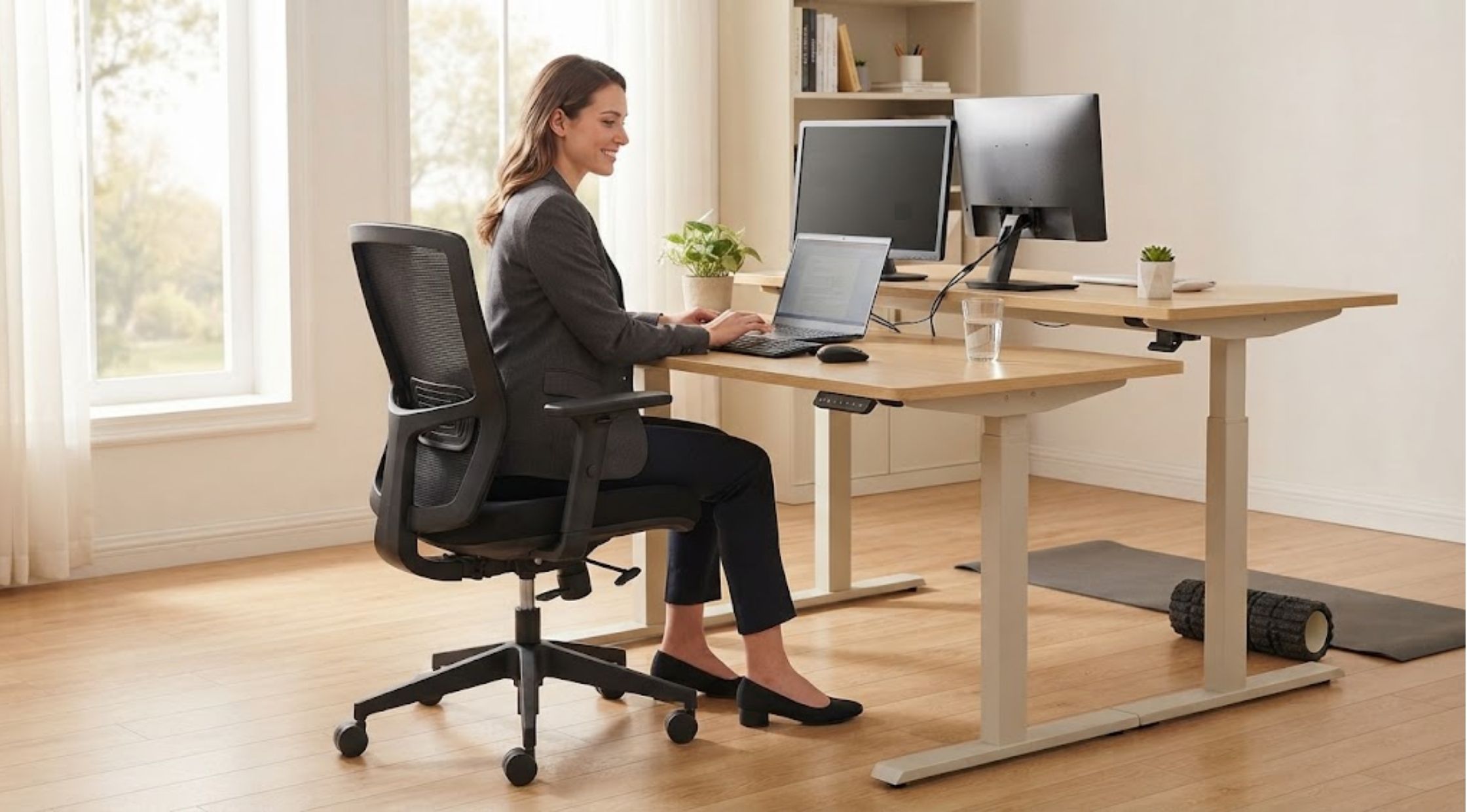
Long workdays can leave your back, neck, and shoulders feeling exhausted. Additionally, poor workspace design can create discomfort without obvious warning. For example, an unsuitable chair, fixed desk, or cluttered setup can reduce daily comfort. Fortunately, OdinLake provides thoughtful workspace solutions that improve comfort and productivity.
Start by Identifying Your Workspace Problems
Your current setup may create several problems during long working sessions. For example, a basic chair may lack proper lumbar support. Likewise, an incorrect desk height can strain your shoulders and wrists. Additionally, sitting for several hours may cause significant discomfort. Static positions can also limit movement throughout your workday. Therefore, evaluate your workspace before purchasing new equipment. First, check your posture, desk height, monitor position, and available legroom. Also, identify when discomfort usually appears during your work routine.
Watch for These Common Warning Signs
An uncomfortable workspace often creates noticeable warning signs. You might experience: Lower-back discomfort after prolonged sitting. Shoulder tension from poor desk positioning. Wrist strain from awkward keyboard placement. Neck discomfort from incorrect monitor height. Fatigue from sitting continuously. Reduced focus during extended work sessions. Consequently, these problems can make productive work unnecessarily difficult. However, you can address many issues through better workspace planning.
Understand What Causes Workspace Discomfort
Furniture alone does not always cause discomfort. Instead, poor body alignment with your workspace often creates problems. For example, a low chair can raise your shoulders. Meanwhile, a high desk can force awkward wrist positions. Additionally, your monitor can affect your posture throughout the day. A poorly positioned screen can make you lean forward repeatedly. Furthermore, continuous sitting can limit opportunities for natural movement. Therefore, your workspace should support comfortable posture changes throughout your schedule.
Improve Your Setup With Practical Adjustments
Start by adjusting your chair to match your body and desk height. Your feet should rest comfortably on the floor. Meanwhile, keep your knees in a natural position. Next, position your monitor at a comfortable viewing height. Also, keep your keyboard and mouse within easy reach. This setup reduces unnecessary shoulder and wrist movement. Additionally, an Ergonomic Office Chair provides better support during extended work sessions. Therefore, choose adjustable seat height, lumbar support, and armrests. Also, check the backrest positioning for personalized support. Furthermore, alternate between sitting and standing throughout your workday. A Standing Desk helps you change positions without interrupting your workflow. This approach can improve comfort during extended work sessions.
Create Better Movement Throughout Your Workday
Even the best Ergonomic Office Furniture cannot replace regular movement. Therefore, schedule short movement breaks throughout your workday. First, stand up after completing a task or finishing a meeting. Next, walk briefly before starting another work session. Additionally, stretch your shoulders, neck, and legs during these breaks. Also, change your sitting position throughout the day. Finally, make small adjustments to prevent your body from staying in one position.
Combine an Ergonomic Office Chair With a Standing Desk
Your chair and desk should work together as one workspace system. An Ergonomic Office Chair supports comfortable sitting during focused tasks. Meanwhile, a Standing Desk provides another working position when sitting becomes uncomfortable. Therefore, this combination gives you greater flexibility throughout your work schedule. First, adjust your desk so your keyboard stays near elbow height. Then, position your monitor for comfortable viewing. When you sit, adjust your chair to maintain proper body alignment. Also, keep your elbows comfortable while operating your keyboard and mouse. Finally, this approach makes Ergonomic Office Furniture more useful. Each component works together and supports your overall workspace needs.
Choose Quality Ergonomic Office Furniture for Long-Term Value
Replacing individual furniture pieces can create compatibility problems. Instead, choose products that follow ergonomic design principles. Moreover, quality furniture often provides greater adjustability and practical customization. These features help you adapt your workspace as your needs change. For example, Odinlake offers workspace solutions focused on comfort and functionality. Its ergonomic designs help users create more adaptable working environments. Therefore, consider adjustability and daily usability beyond appearance. A visually attractive workspace should also support comfortable working positions.
Focus on Features That Actually Matter
When comparing workspace products, prioritize features that solve your specific problems. For an Ergonomic Office Chair, examine lumbar support, seat adjustment, armrests, and reclining functions. Also, check whether the chair supports you comfortably during extended work sessions. For a Standing Desk, examine height adjustment, stability, desktop space, and control options. Choose dimensions that fit your monitor, keyboard, and other essential equipment. Finally, consider how all your workspace products work together. Therefore, choose **Ergonomic Office Furniture** that creates a comfortable, organized environment.
Upgrade Your Workspace for Greater Daily Comfort
A well-designed workspace can make long workdays more manageable. Moreover, better furniture supports healthier positioning and easier adjustments. An Ergonomic Office Chair can improve comfort during focused work. Meanwhile, a Standing Desk provides another position throughout your daily routine. Together, these choices create a more flexible workstation. Additionally, they help you organize equipment around your natural working movements. Odinlake provides practical options for improving your workspace. Therefore, you can upgrade your setup without completely redesigning it. First, consider your current challenges before choosing specific furniture. Then, select furniture that directly addresses those workspace needs.
Make Smarter Workspace Decisions
You do not need to replace everything immediately. Instead, start with the equipment causing the greatest discomfort. Then, improve your monitor position, keyboard placement, and daily movement habits. Gradually, add Ergonomic Office Furniture to address remaining workspace problems. A thoughtful Ergonomic Office Chair can improve your sitting setup. Similarly, a Standing Desk can introduce useful position changes. Ultimately, choose furniture based on comfort, adjustability, durability, and functionality. Additionally, Odinlake can support your workspace upgrade with thoughtful solutions. Therefore, small improvements today can create a noticeably better working environment tomorrow.
Recent Blogs
-
PNGTree: Your Design Toolbox or a Licensing Minefield
-

How to Choose Sexy Lingerie and Babydoll Lingerie That Feels Right
-
How to Choose the Best Portable Sauna for Relaxation at Home
-

How to Choose 70s Outfits and Retro Wedding Dresses Without Looking Outdated
-

How to Choose the Right Darth Vader Helmet and Mandalorian Helmet for Your Collection